¶ Converting ICEfaces 1.8 Applications to ICEfaces 3 Tutorial
With the release of JSF 2 and ICEfaces 3, a common situation arises of porting and converting existing ICEfaces 1.8.x applications. This tutorial will demonstrate the required steps to convert a legacy application to "compat mode" in ICEfaces 3. This means you can still use your existing ice: components and backing beans, but aren't yet taking advantage of ICEfaces 3 specific features and benefits. The majority of the conversion effort involves configuration files and libraries, so most of your page markup won't need to be significantly changed.
This tutorial assumes the reader has a basic understanding of JSF and ICEfaces, especially creating and working with projects related to those technologies. The focus is not to teach the foundations, but instead to learn about porting applications. More information about porting can also be found here.
The goal of this tutorial is to examine a real world ICEfaces 1.8.x application. Once we have an understanding of the project we will begin the steps to port the application to ICEfaces 3. The application is a slightly modified version of the "jobApplication" used in the ICEfaces Online Training. There is a central form based page that can redirect to two pages based on different outcomes.
Here is the entire list of topics focused on throughout this tutorial:
- jobApplication Introduction
- Step 1 - Add and Update Libraries
- Step 1a - Remove Old Libraries
- Step 1b - Add Compat Jars
- Step 1c - Add JSF 2 Jars
- Step 1d - Add ICEfaces EE Core Framework Extensions Jar
- Step 2 - Update faces-config.xml
- Step 2a - Update Header
- Step 2b - Remove View Handler
- Step 2c - Change Bean Scopes
- Step 3 - Update web.xml
- Step 3a - Remove Old Servlets and Listeners
- Step 3b - Add Resources Servlet
- Step 3c - Modify Faces Servlet
- Step 3d - Modify Context Parameters
- Step 4 - Modify Page Markup
- Step 4a - Modify index.jsp
- Step 4b - Modify applicantForm.xhtml
- Step 4c - Modify thankYou.xhtml and noThanks.xhtml
- Step 4d - Replace ice:outputDeclaration
- Step 5 - Build and Deploy the Application
And available source code downloads:
- jobApplication 1.8 Source Code
- jobApplication ICEfaces 3 Source Code
¶ Development Tools Used
The following tools were used to create the project.
- Eclipse IDE for Java EE Developers - Version Indigo
- Tomcat 7.x Web Server
- Java 6.x
- ICEfaces 1.8.2 and ICEfaces 3
¶ jobApplication 1.8 Source Code
| Example | Source | Notes |
|---|---|---|
| jobApplication 1.8 project | jobApplication 1.8 source code | The Eclipse workspace of the jobApplication project written in ICEfaces 1.8. |
¶ jobApplication Introduction
Download and extract the above source code bundle, and *Import -> Existing Project into Workspace* the folder into your Eclipse instance. Build and deploy the application to your Tomcat instance, and navigate to the deployed jobApplication. You will see a page similar to the following:
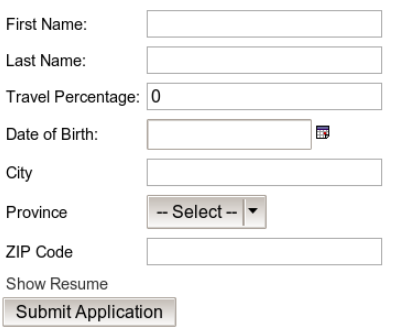
Now let's examine the page code, to get a better idea of what the application is doing. There are three main pages:
**applicantForm.xhtml**** Main page that has a series of internationalized form fields with validation, partialSubmit, a ice:selectInputDate component, etc.**noThanks.xhtml**** Basic page redirected to when the first name equals "John".**thankYou.xhtml**** Similar page redirected to when the first name is anything else.
The Java code is fairly standard for 1.8, focusing on two beans:
**bean.backing.ApplicantForm.java**** Controller/backing bean for theapplicantForm.xhtmlpage. This controls the submission and some of the rendering toggles on that page.**bean.model.Applicant.java**** Model object containing variables for the different Applicant fields, like First Name and Travel Percentage. No UI specific functionality.- Supporting Beans
- The
ProvinceSupport.javaandProvince.javaclasses are used to back the available items in the ice:selectOneMenu found on the main page.
- The
Other features:
- Internationalization
- The
messages_en.propertiesandJSF-override_en.propertiesare used to internationalize the various form labels.
- The
¶ Begin Converting the jobApplication
Now that we understand the project, we'll start the 1.8 to ICEfaces 3 conversion process. The steps below will help you understand the requirements of porting, and can be applied to any of your own projects.
¶ Step 1 - Add and Update Libraries
Currently jobApplicaiton is using ICEfaces 1.8.2 and JSF 1.2. We will want to upgrade these versions to 3 and 2, respectively.
¶ Step 1a - Remove Old Libraries
First remove references in our project to ICEfaces 1.8.2 and JSF 1.2. This will likely require *Build Path* changes inside Eclipse. The ICEfaces Core, Facelets, and Support Libraries 1.8.2 should be removed, as should JSF 1.2 Sun RI. The exact naming may be different in your project.
¶ Step 1b - Add Compat Jars
Download and extract the ICEfaces 3 bundle. Copy the following jar files from icefaces/lib to jobApplication/WEB-INF/lib/:
- icefaces-compat.jar
- icefaces.jar
Copy the following jar files from icefaces/lib/compat to jobApplication/WEB-INF/lib/:
- commons-beanutils.jar
- commons-collections.jar
- commons-digester.jar
- commons-logging.jar
- jstl.jar
- jxl.jar
- krysalis-jCharts-1.0.0-alpha-1.jar
The primary jars are icefaces.jar and icefaces-compat.jar. The former contains all the ICEfaces 3 code we need, while the latter has compat specific code around ice: components.
¶ Step 1c - Add JSF 2 Jars
Now we will add JSF 2. Copy the following jar file from icefaces/lib/mojarra to jobApplication/WEB-INF/lib/:
- javax.faces.jar
There will probably be a few errors within the project because of these changes. That's okay, we just need to modify the configuration and pages to be JSF 2 specific to resolve this problem.
¶ Step 1d - Add ICEfaces EE Core Framework Extensions Jar
With this tutorial application, this step is unnecessary, since it almost exclusively uses component tags and not html tags. But with other applications, that mix html tags amongst component tags, there is an issue with JSF 2 Facelets where html fragments become UIInstructions, such that one html tag could become several UIInstructions components, or several html tags could become one UIInstructions component, depending on their arrangement. There is no one-to-one mapping, like what exists with ICEfaces 1.x, where it ships with a modified Facelets implementation that addresses this issue.
If this application did combine html tags with component tags, and in particular h:panelGrid or ice:panelGrid, such as like this:
<h:panelGrid columns="1">
    <center>
        <h:inputText .../>
    </center>
</h:panelGrid>
The expected component tree would be a <h:panelGrid> with a single
child tag, which itself would have a single <h:inputText> child. With standard JSF, what happens instead is that <h:panelGrid> has 3 children: a UIInstructions child corresponding to the opening tag, the <h:inputText>, and a UIInstructions child corresponding to the closing tag. The <h:panelGrid> component then renders each of its children into a separate tag, which will confuse the browser, since the starting will be in a separate than the ending .
If you're developing with ICEfaces EE, then the simplest solution is to include the ICEfaces EE Core Framework Extensions fix for this issue, which involves adding a jar to your war, and setting a context param in your web.xml.
¶ Step 2 - Update faces-config.xml
Now we will change the XML configuration file faces-config.xml. The main changes will be scope related, to accomodate the new JSF 2 scopes.
¶ Step 2a - Update Header
First we'll update the faces-config.xml header to be 2, instead of 1.2. Near the top of the file replace:
Old faces-config.xml Header
<faces-config xmlns="http://java.sun.com/xml/ns/javaee"
              xmlns:xsi="http://www.w3.org/2001/XMLSchema-instance"
              xsi:schemaLocation="http://java.sun.com/xml/ns/javaee
                                  http://java.sun.com/xml/ns/javaee/web-facesconfig_1_2.xsd"
              version="1.2">
With:
New faces-config.xml Header
<faces-config xmlns="http://java.sun.com/xml/ns/javaee"
              xmlns:xsi="http://www.w3.org/2001/XMLSchema-instance"
              xsi:schemaLocation="http://java.sun.com/xml/ns/javaee
                                  http://java.sun.com/xml/ns/javaee/web-facesconfig_2_0.xsd"
              version="2.0">
As you can see we changed the version and schema location to 2.
¶ Step 2b - Remove View Handler
Now we can remove the old reference to the D2DFaceletViewHandler, as this customization is handled transparently in ICEfaces 3. Remove the following line inside the <application> node:
Old faces-config.xml View Handler
...
<view-handler>com.icesoft.faces.facelets.D2DFaceletViewHandler</view-handler>
...
¶ Step 2c - Change Bean Scopes
Next we will modify the old <managed-bean-scope> nodes to conform to those available in ICEfaces 3. Previously ICEfaces 1.8.x used "extended request scope", which meant request was handled differently than it is now. The closest we can get to duplicating this functionality is using the JSF 2 view scope.
Change all 3 beans to have a scope of view:
Old faces-config.xml Bean Scope
...
<managed-bean-scope>request</managed-bean-scope>
...
Will become:
New faces-config.xml Bean Scope
...
<managed-bean-scope>view</managed-bean-scope>
...
Using @ViewScoped Beans
While @ViewScoped beans are a welcome addition to JSF, they do not behave identically to the older extended request scope beans from ICEfaces 1.x. Some things to keep in mind while migrating:
Using component bindings with @ViewScoped beans is strongly discouraged. Due to a known bug in JSF 2.1 (http://java.net/jira/browse/JAVASERVERFACES-1492), @ViewScoped beans are not created until after the view has been restored, meaning they are not available when the binding typically occurs. Component bindings are not recommended in general so, if possible, you should consider modifying the design of your application to avoid using them. If that's not possible you should consider using @RequestScoped beans with the bindings.
Related to the point above, using <c:forEach> or <c:if> tags with @ViewScoped beans leads to similar issues (see http://java.net/jira/browse/JAVASERVERFACES_SPEC_PUBLIC-928). Those tags are handled during the Restore View phase when the @ViewScoped beans are not available. If you are using those tags, you should either change the scoped of the beans involved or, in the case of <c:forEach>, replace it with the Facelet tag, ui:repeat.
These issues should be fixed in both the spec and implementations of JSF 2.2. It also appears to be fixed in Mojarra 2.1.18 and above.
¶ Step 3 - Update web.xml
Now we will change the XML configuration file web.xml. The main change will be servlet mappings and adding some context parameters for ICEfaces 3.
¶ Step 3a - Remove Old Servlets and Listeners
The previously declared Persistent Faces Servlet and Blocking Servlet are no longer needed in ICEfaces 3, as their functionality has changed and setup has been reduced. Remove all declarations and mappings for those two servlets:
Old web.xml ICEfaces Servlets
    <servlet>
        <servlet-name>Persistent Faces Servlet</servlet-name>
        <servlet-class>com.icesoft.faces.webapp.xmlhttp.PersistentFacesServlet</servlet-class>
        <load-on-startup>1</load-on-startup>
    </servlet>

    <servlet-mapping>
        <servlet-name>Persistent Faces Servlet</servlet-name>
        <url-pattern>*.iface</url-pattern>
        <url-pattern>*.jspx</url-pattern>
        <url-pattern>/xmlhttp/*</url-pattern>
        <url-pattern>*.faces</url-pattern>
        <url-pattern>*.jsf</url-pattern>
        <url-pattern>/faces/*</url-pattern>
    </servlet-mapping>

    <servlet>
        <servlet-name>Blocking Servlet</servlet-name>
        <servlet-class>com.icesoft.faces.webapp.xmlhttp.BlockingServlet</servlet-class>
        <load-on-startup>1</load-on-startup>
    </servlet>

    <servlet-mapping>
        <servlet-name>Blocking Servlet</servlet-name>
        <url-pattern>/block/*</url-pattern>
    </servlet-mapping>
In addition, the ContextEventRepeater is no longer required so the declaration for that listener can be removed as well:
Old web.xml ICEfaces Listeners
        <listener>
        <listener-class>com.icesoft.faces.util.event.servlet.ContextEventRepeater</listener-class>
    </listener>
¶ Step 3b - Add Resources Servlet
As part of the compatibility requirements of porting a project, a new servlet will be added:
New web.xml Resources Servlet
    <servlet>
        <servlet-name>Resource Servlet</servlet-name>
        <servlet-class>com.icesoft.faces.webapp.CompatResourceServlet</servlet-class>
        <load-on-startup>1</load-on-startup>
    </servlet>

    <servlet-mapping>
        <servlet-name>Resource Servlet</servlet-name>
        <url-pattern>/xmlhttp/*</url-pattern>
    </servlet-mapping>
¶ Step 3c - Modify Faces Servlet
The purpose of the FacesServlet has changed between 1.8 and ICEfaces 3, and so the declaration and mapping must as well. Replace the old declaration:
Old web.xml Faces Servlet
    <servlet>
        <servlet-name>Faces Servlet</servlet-name>
        <servlet-class>javax.faces.webapp.FacesServlet</servlet-class>
        <load-on-startup>1</load-on-startup>
    </servlet>
With the new declaration and mapping:
New web.xml Faces Servlet
    <servlet>
        <servlet-name>Faces Servlet</servlet-name>
        <servlet-class>javax.faces.webapp.FacesServlet</servlet-class>
        <async-supported>true</async-supported>  <!--only add this line for Servlet 3.0 servers-->
    </servlet>

    <servlet-mapping>
        <servlet-name>Faces Servlet</servlet-name>
        <url-pattern>*.jsf</url-pattern>
    </servlet-mapping>

    <servlet-mapping>
        <servlet-name>Faces Servlet</servlet-name>
        <url-pattern>/icefaces/*</url-pattern>
    </servlet-mapping>
¶ Step 3d - Modify Context Parameters
The last change in web.xml is to change some of the context-param variables. Remove unnecessary parameters:
Old web.xml Context Parameters
    <context-param>
        <description>State saving method: 'client' or 'server' (=default). See JSF Specification 2.5.2</description>
        <param-name>javax.faces.STATE_SAVING_METHOD</param-name>
        <param-value>server</param-value>
    </context-param>

    <context-param>
        <param-name>javax.faces.DEFAULT_SUFFIX</param-name>
        <param-value>.xhtml</param-value>
    </context-param>
Add a pair of new context-param variables that help ICEfaces 3 act more like 1.8.x in regards to markup and validation:
New web.xml Context Parameters
    <context-param>
        <param-name>javax.faces.FACELETS_SKIP_COMMENTS</param-name>
        <param-value>true</param-value>
    </context-param>

    <context-param>
        <param-name>javax.faces.VALIDATE_EMPTY_FIELDS</param-name>
        <param-value>false</param-value>
    </context-param>
Modify context-parameters that have changed. For example, while backward compatible, the old facelets.REFRESH_PERIOD parameter should be updated to the official javax.faces.FACELETS_REFRESH_PERIOD. The value is the number of seconds to wait before checking whether a facelets page should be recompiled. A value of -1 means never check:
Modified web.xml Context Parameters
    <context-param>
        <param-name>javax.faces.FACELETS_REFRESH_PERIOD</param-name>
        <param-value>-1</param-value>
    </context-param>
¶ Step 4 - Modify Page Markup
The final change is to modify the page markup to conform to JSF 2 standards. These changes are mostly related to the header and format of the page, while all the ice: components can remain as they are.
¶ Step 4a - Modify index.jsp
The first page to change is the simplest, and that is modifying that page index.jsp redirects to. Change the old redirect:
Old index.jsp Redirect
...
response.sendRedirect("applicantForm.iface");
...
To point to the new mapping extension of the applicationForm page:
New index.jsp Redirect
...
response.sendRedirect("applicantForm.jsf");
...
¶ Step 4b - Modify applicantForm.xhtml
The header, namespace, and body tags need to be modified to port 1.8 markup to JSF 2. Replace the following tags near the top of the page:
Old applicantForm.xhtml Code
...
<f:view xmlns:f="http://java.sun.com/jsf/core"
     xmlns:ice="http://www.icesoft.com/icefaces/component">
    <html>
    <head>
        <title>Job Application</title>
        <ice:outputStyle href="./xmlhttp/css/xp/xp.css" />
    </head>
    <body>
...
With the following:
New applicantForm.xhtml Code
<html xmlns="http://www.w3.org/1999/xhtml"
      xmlns:h="http://java.sun.com/jsf/html"
      xmlns:f="http://java.sun.com/jsf/core"
      xmlns:ice="http://www.icesoft.com/icefaces/component">
    <h:head>
        <title>Job Application</title>
        <ice:outputStyle href="./xmlhttp/css/xp/xp.css" />
    </h:head>
    <h:body>
Remember to replace all closing tags for the above changes.
This change is necessary because JSF 2 uses html as the parent container tag of a page, instead of f:view. Also, because AJAX is built in to JSF 2, h:head and h:body are required instead of the old plain HTML head and body.
¶ Step 4c - Modify thankYou.xhtml and noThanks.xhtml
Similary, the headers of our other two pages will need to be changed. Replace the old header code in both pages:
Old Header Code
<f:view xmlns:f="http://java.sun.com/jsf/core"
     xmlns:ice="http://www.icesoft.com/icefaces/component">
    <html>
    <head><title>Thank You/No Thanks</title></head>
    <body>
With a similar update:
New Header Code
<html xmlns="http://www.w3.org/1999/xhtml"
      xmlns:h="http://java.sun.com/jsf/html"
      xmlns:ice="http://www.icesoft.com/icefaces/component">
    <h:head><title>No Thanks</title></h:head>
    <h:body>
As before, remember to update the closing tags as well.
¶ Step 4d - Replace ice:outputDeclaration
The ice:outputDeclaration tag has been deprecated for ICEfaces 3 and should be replaced with the DOCTYPE tag. If it is present in your application, remove the following:
ice:outputDeclaration
<ice:outputDeclaration doctypeRoot="HTML"
                       doctypePublic="-//W3C//DTD XHTML 1.0 Transitional//EN"
                       doctypeSystem="http://www.w3.org/TR/xhtml1/DTD/xhtml1-transitional.dtd"/>
Replace it with:
DOCTYPE Tag
<!DOCTYPE HTML PUBLIC "-//W3C//DTD XHTML 1.0 Transitional//EN"
                      "http://www.w3.org/TR/xhtml1/DTD/xhtml1-transitional.dtd">
¶ Step 5 - Build and Deploy the Application
Those are all the changes we needed! Overall porting 1.8 to ICEfaces 3 is fairly simple, and focuses more on configuration changes instead of being forced to modify your Java code or any functional markup.
Build and re-deploy the jobApplication and test it to ensure the functionality remains the same. From a user point of view the page will look the same, but now we're running on the modern ICEfaces 3!
¶ jobApplication Source Code
The resulting code for the ICEfaces 3 version of the jobApplication is available if you need.
| Example | Source | Notes |
|---|---|---|
| jobApplication 3 project | jobApplication 3 source code | Source code of the jobApplication project in ICEfaces 3. |