¶ Enterprise Push Server
¶ Introduction
The EPS (Enterprise Push Server) manages a single Ajax Push blocking connection with the client browser sharing it between any number of deployed ICEfaces applications and portlets in both a stand-alone and clustered environments. EPS delivers key additional features targeted at large-scale and high-availability enterprise deployments. Specifically, EPS provides:
- Management of blocking push connections to one or more ICEfaces applications.
- Distributed management of blocking push connections to one or more ICEfaces applications across the cluster.
- Asynchronous Request Processing (ARP) integration for thread-level scalability.
- Load-balancing of blocking push requests.
- Fail-over of blocking push requests.
¶ Stand-Alone Deployments
EPS fully supports stand-alone deployments of one or more ICEfaces applications that use Ajax Push. It manages a single blocking connection per client browser instance to one or more ICEfaces applications. A basic stand-alone deployment utilizes an optional web server and JMS for inter-process communication as illustrated below.
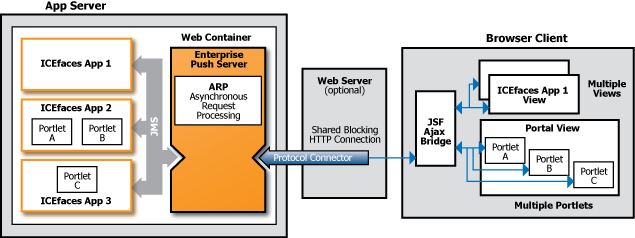
Figure 1 - Stand-Alone Deployment using EPS
Under this architecture, EPS will share a single blocking connection to a client browser instance with one or more ICEfaces applications, and the ICEfaces Ajax Bridge on the client browser instance will share that same single blocking connection to EPS with one or more views onto one or more ICEfaces applications. This ensures that a single blocking connection is used for Ajax Push and the client browser connection limit can never be exceeded.
JMS is used for all communications between EPS and the ICEfaces applications it is serving. The ICEfaces application must be configured to utilize EPS.
¶ Cluster Deployments
EPS fully supports cluster deployments of one or more ICEfaces applications that use Ajax Push. It manages a single blocking connection per client browser instance to one or more ICEfaces applications deployed to multiple nodes within the cluster. A basic cluster deployment utilizes a web server for load-balancing and fail-over, and JMS for inter-process communication as illustrated below.
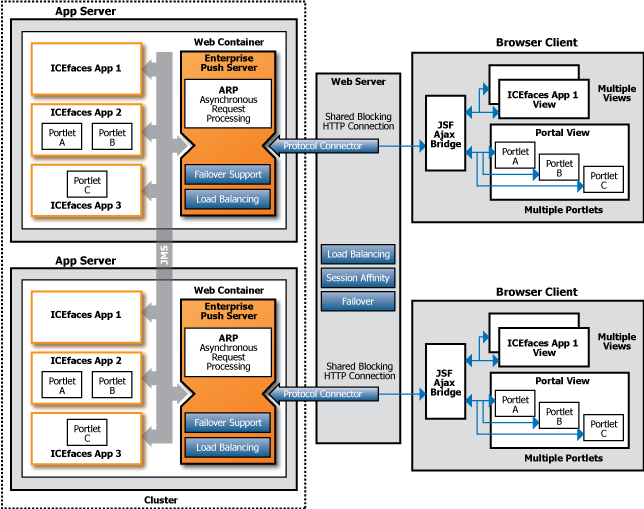
Figure 2 - Cluster Deployment using EPS
Under this architecture, in addition to the stand-alone deployment benefits as explained in the previous section, blocking connections from client browser instances are load-balanced across all available EPS instances within the cluster.
¶ Load-Balancing
Load-balancing of EPS and the ICEfaces applications within a cluster relies on standard Java EE load-balancing techniques, which includes optional session affinity, and proprietary techniques and configurations depending on the target environment. Refer to the Appendices for environment specific configurations regarding load-balancing.
¶ Fail-Over
Fail-Over of EPS and the ICEfaces applications within a cluster relies on standard Java EE fail-over techniques, which includes session replication, and proprietary techniques and configurations depending on the target environment. Refer to the Appendices for environment specific configurations regarding fail-over.
¶ Asynchronous Request Processing
Because blocking connections associated with Ajax Push are held indefinitely in anticipation of a push event, the mechanism requires a thread per connection under the standard Servlet implementation up until but not including Servlet 3.0. Depending on the characteristics of the system, this may or may not be a limiting factor for scaling the deployment. The thread scalability issue can be overcome using an Asynchronous Request Processing (ARP) mechanism that bounds the number of threads required to manage any number of blocking connections. ARP mechanisms are typically implemented with non-blocking IO, which tend to be more CPU intensive, so can introduce a scalability threshold of their own.
Both EPS and the ICEfaces application can be configured to use ARP or not, providing flexibility for your specific deployment. Before Servlet 3.0, no standard existed in Java EE for ARP in the Servlet model.
¶ Configuration
EPS comes with a number of configuration options, namely ARP and JMS can be configured as well as aspects of EPS itself.
¶ Configuring ARP
The default Ant build for EPS does not support Servlet 3's ARP. In order to configure EPS to support Servlet 3's ARP it needs to be build using Ant as follows:
ant -Dservlet="3.0" clean build.war
¶ Configuring JMS
EPS comes with an auto-detect mechanism which in most cases can detect the environment correctly and use the correct messaging properties to connect to the message broker. EPS includes the following messaging properties for the supported environments:
| Environment | Messaging Properties |
|---|---|
| GlassFish Server | open-mq.properties |
| JBoss AS | jboss-messaging.properties |
| JBoss AS (HA) | jboss-messaging-ha.properties |
| Tomcat/ActiveMQ | active-mq.properties |
| WebLogic Server | weblogic-jms.properties |
| WebSphere Application Server | websphere-default-messaging.properties |
Custom messaging properties files can be used as well. The necessary properties include:
java.naming.factory.initialjava.naming.factory.url.pkgsjava.naming.provider.urlcom.icesoft.net.messaging.jms.topicConnectionFactoryNamecom.icesoft.net.messaging.jms.topicNamePrefix
¶ Configuring EPS
EPS can be configured using a number of context parameters that can be set in its deployment descriptor (web.xml). In the following table an overview of these parameters are given with the default values and a description.
| Context Parameter | Default Value | Description |
|---|---|---|
| com.icesoft.push.interval | 10000 | The interval in milliseconds between retries when initial connection to the message broker failed. Please note that this context parameter is also applicable to the ICEfaces application if configured to utilize EPS. |
| com.icesoft.push.maxRetries | 30 | The maximum number of retries when initial connection to the message broker failed. Please note that this context parameter is also applicable to the ICEfaces application if configured to utilize EPS. |
| com.icesoft.push.threadPoolSize | 10 | The size of the thread pool used by the Default Message Service for connection and reconnection logic. Please note that this context parameter is also applicable to the ICEfaces application if configured to utilize EPS. |
| com.icesoft.net.messaging.defaultTopicName | icepush | The default topic name used by the Message Service Client (MSC). Please note that this context parameter is also applicable to the ICEfaces application if configured to utilize EPS. |
| com.icesoft.net.messaging.messageMaxDelay | 100 | The maximum delay in milliseconds used by the message pipeline between the time a message comes in and the time a message is actually send. This allows for multiple messages to be concatenated into one message before actually being send. Please note that this context parameter is also applicable to the ICEfaces application if configured to utilize EPS. |
| com.icesoft.net.messaging.messageMaxLength | 4096 | The maximum length in characters used by the message pipeline of a concatenated message. If the maximum is reached the concatenated message is send. Please note that this context parameter is also applicable to the ICEfaces application if configured to utilize EPS. |
| com.icesoft.net.messaging.properties | The name of the messaging properties files to be used when connecting to the message broker. By default the auto-detection mechanism is used to determine the correct messaging properties file. Please note that this context parameter is also applicable to the ICEfaces application if configured to utilize EPS. | |
| com.icesoft.net.messaging.threadPoolSize | 15 | The size of the thread pool used by the Message Service Client (MSC) for the message receivers and the message pipelines. Please note that this context parameter is also applicable to the ICEfaces application if configured to utilize EPS. |
¶ Build
EPS comes with a single build target tailored to the Servlet 2.5 environment by default. Following is the list of Ant targets for EPS:
| Target | Description |
|---|---|
| clean | Clean up all artifacts. |
| build.war | Build .war-file for the Servlet 2.5 environment. |
¶ Deployment
The build process will produce a Java archive (eps.jar) and a Web archive (eps.war). The eps.jar can be used to configure the ICEfaces application to utilize EPS by including it into the ICEfaces application's Web archive at WEB-INF/lib. The eps.war is EPS itself which can be deployed to the target environment.
Once deployed, any EPS instance can handle blocking push connections from any client browser instance to any ICEfaces application. It is not strictly necessary to deploy EPS to every node within the cluster, but that is the most robust deployment for load-balancing and fail-over.
Tip
EPS should be deployed to multiple nodes within the cluster to avoid a single point of failure for blocking push connection management. The recommended configuration is to deploy EPS to every node within the cluster hosting one or more ICEfaces applications.